Ask for the item you need and let sellers come to you — on L2Exodus
Complete guide · for playersIn the auction, the seller lists the item and buyers compete. A Buy Order is the opposite: the buyer says what they want — which item, how many and how much they pay for each — and leaves the money held. Any player can sell to that order later, even while the buyer is offline.
It solves two problems:
And, as in the auction: nobody holds your item and nobody holds your money. Both stay in the server's custody and are only handed over when the sale happens.
You post "I want 50 scrolls at 5 L-Coin each". The server holds the 250 L-Coin. Whoever sells the scrolls is paid, and you receive the scrolls by mail. Nobody has to trust anybody.
There is only one way: talk to the Order Broker, the Buy Order NPC.
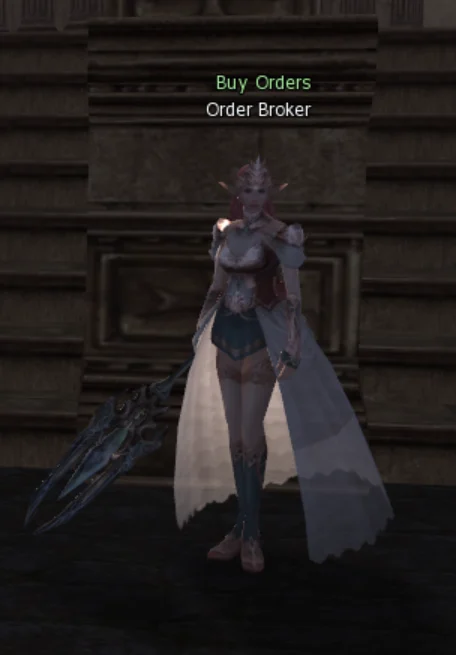
Buy Orders have no Community Board button and no chat command. That is on purpose: the actions that move items and coin — creating an order and selling — require you to be at the NPC. Once the screen is open, you can browse the orders and cancel your own from anywhere.
Level 40 to create an order and level 40 to sell. The character must also be at least 7 days old, for both — this stops a character made on the spot just to launder coin.
At the top are your character and your status: whether you can already create orders and sell, or what is missing.
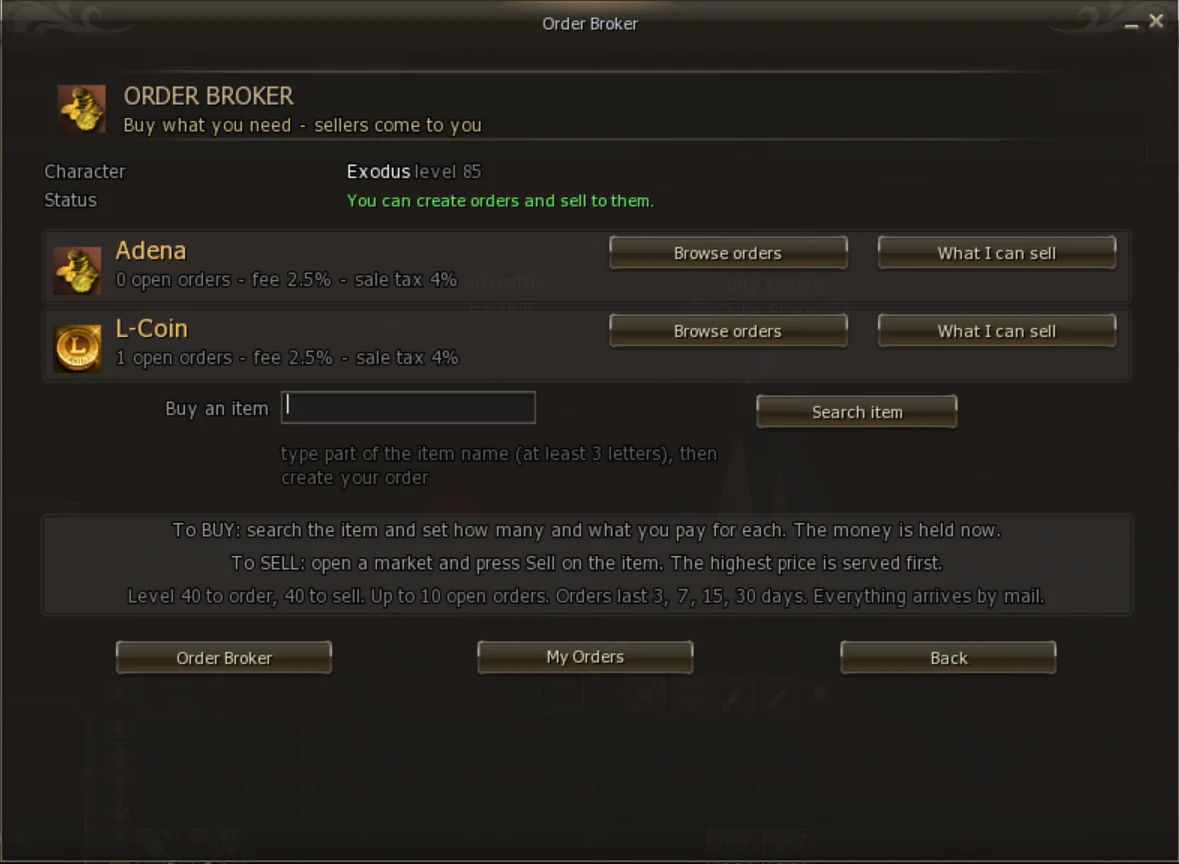
In the middle are the markets, one per currency, with the number of open orders and the fees. At the bottom, the rules box reads the server configuration — what is written there is always what is in force.
| Button | What it is for |
|---|---|
| Browse orders | See every open order in that market |
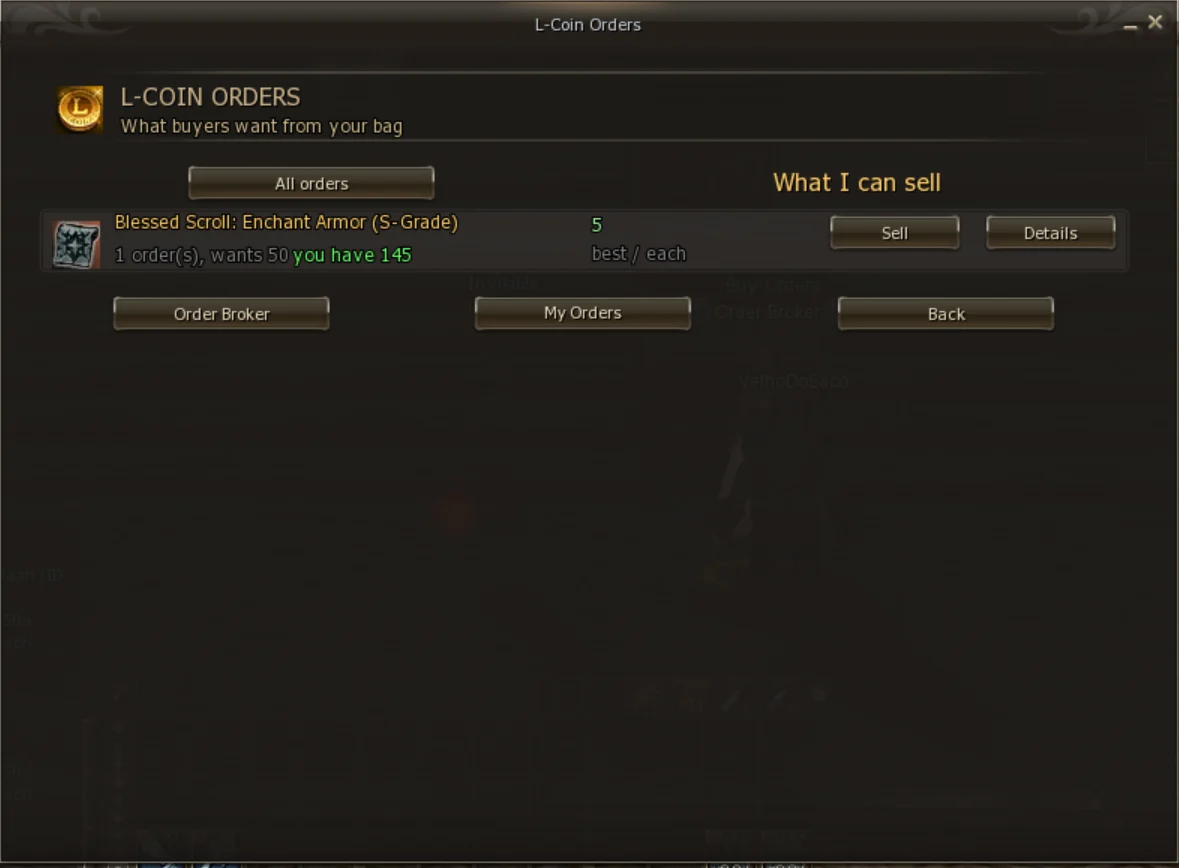
| What I can sell | See only the orders for items that are in your bag — the shortest way to sell |
| Search item | Look an item up by name to create a buy order |
| My Orders | The orders you created: open, filled, cancelled and expired |
On the bottom bar, Order Broker returns to this screen, My Orders opens your orders and Back goes back one screen.
back to contents ↑Each market trades in one currency only. When you create the order, you choose which one to pay in.
| Market | Currency | Lowest price per unit | Creation fee | Sale tax |
|---|---|---|---|---|
| Adena | Adena | 1,000 | 2.5% (minimum 1,000) | 4% |
| L-Coin | L-Coin | 1 | 2.5% (minimum 1) | 4% |
The two markets are independent: the queue of one never mixes with the other. An order of 10 L-Coin per unit never competes with one of 5,000,000 adena.
There is no Adena order paying in Adena, nor an L-Coin order paying in L-Coin. For those items, that currency's market does not even show up when you create the order.
Three screens: find the item, set up the order, check it and pay.
On the home screen, type part of the name in Buy an item (at least 3 letters) and click Search item.
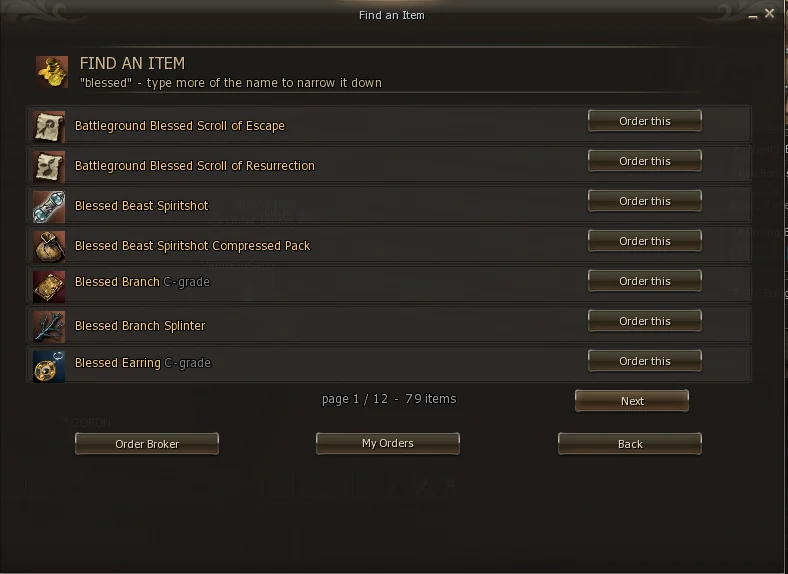
The more of the name you type, the shorter the list. Click Order this on the item you want.
The search only shows items that can actually be ordered. Quest items, untradeable items, items not used in the game, and items staff removed from the list do not appear.
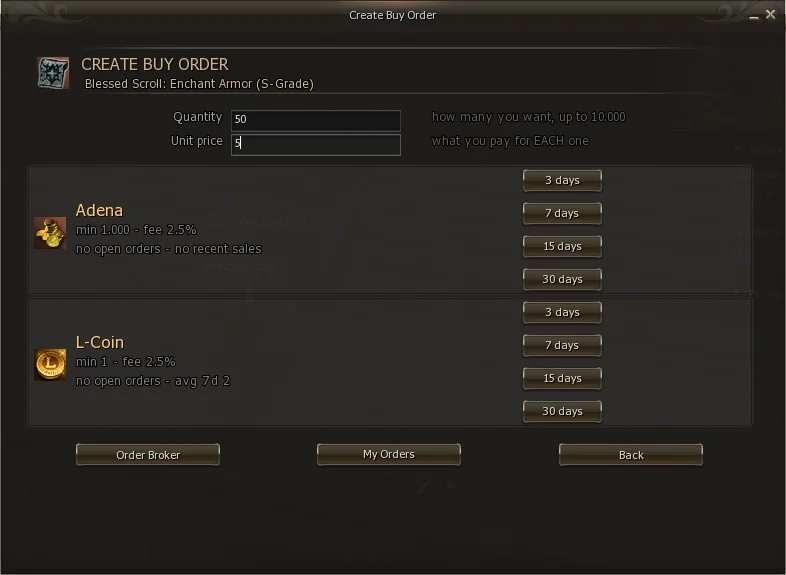
| Field | What it means |
|---|---|
| Enchant | Only shown for weapons, armor and accessories. The exact enchant you want. 0 for the plain item, or the +N you want. |
| Quantity | How many units you want, up to 10,000 per order. |
| Unit price | What you pay for each unit — not the total. |
In each market the screen shows the best open price right now and the average price of the last 7 days of sales made. Use it so you neither overpay nor bid so low that nobody sells.
The duration is on each market's buttons: 3, 7, 15 or 30 days. Fill in the fields and click the duration of the market you picked.
An order for a +3 sword is only filled by a +3 sword. If you want the plain sword, leave 0. Items with augmentation or an elemental attribute cannot be bought through orders.
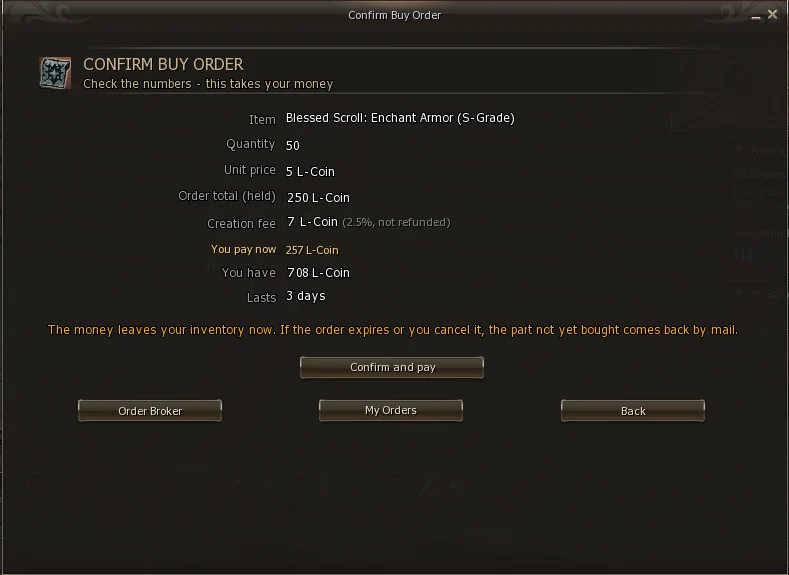
| Line | What it is |
|---|---|
| Order total (held) | Quantity × price per unit. This amount is held until the units are bought |
| Creation fee | The creation fee, 2.5% of the total, rounded up. It is not refunded, even if you cancel |
| You pay now | Total + fee: what leaves your inventory now |
| You have | How much of that currency you carry |
| Lasts | How many days the order stays open |
In the example: 50 units at 5 L-Coin make 250 held, plus 7 fee (2.5% of 250 is 6.25, rounded up to 7), so 257 L-Coin leave at once. If everything is right, click Confirm and pay.
The moment you confirm, the amount leaves your inventory and goes into the server's custody. If the order expires or you cancel it, the part not yet bought comes back by mail. The creation fee does not.
The confirmation screen exists so you catch typos — one extra zero in the price per unit is expensive. Check Unit price and You pay now before clicking.
For each item (at the same enchant and in the same market) the orders form a queue. When someone sells, the server walks the queue from top to bottom:
So paying a little more puts your order in front. And a seller never gets less than the best order in the queue offers.
The sale happens at the order's price, not at an average. If your order pays 5 per unit, the seller gets 5 per unit. There is no "change" or difference to return — what was held is exactly what will be paid.
A 50-unit order can be filled bit by bit, by several sellers. Each sale delivers what was sold; the rest stays in the queue until it runs out, expires or you cancel.
On the home screen, click Browse orders on the market you want. The list shows one item per row, with what buyers want.
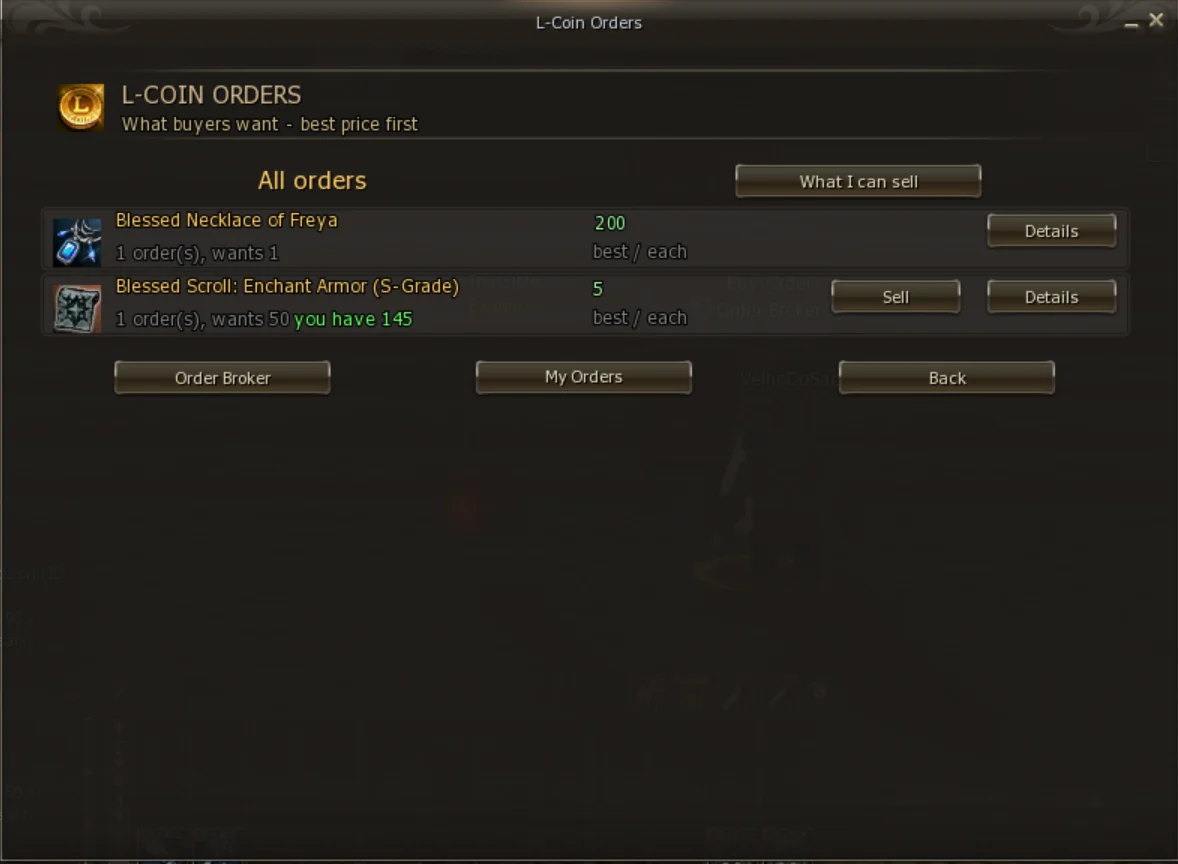
| On the row | What it shows |
|---|---|
| Item name | With the enchant, if any (+3). Orders for different enchants are different rows |
| order(s), wants | How many orders exist and how many units buyers want in total |
| you have | In green: how many of that item you carry right now |
| best / each | The best price per unit paid today |
| Sell | Only shown if you have the item and somebody wants it. Takes you straight to the sale |
| Details | The order book of that item |
At the top of the list there are two modes. All orders shows the whole market, so you can see what is being sought and at what price. What I can sell shows only what is in your bag — the shortest way to sell.
Details opens the queue for that item, in the order the orders will be served.
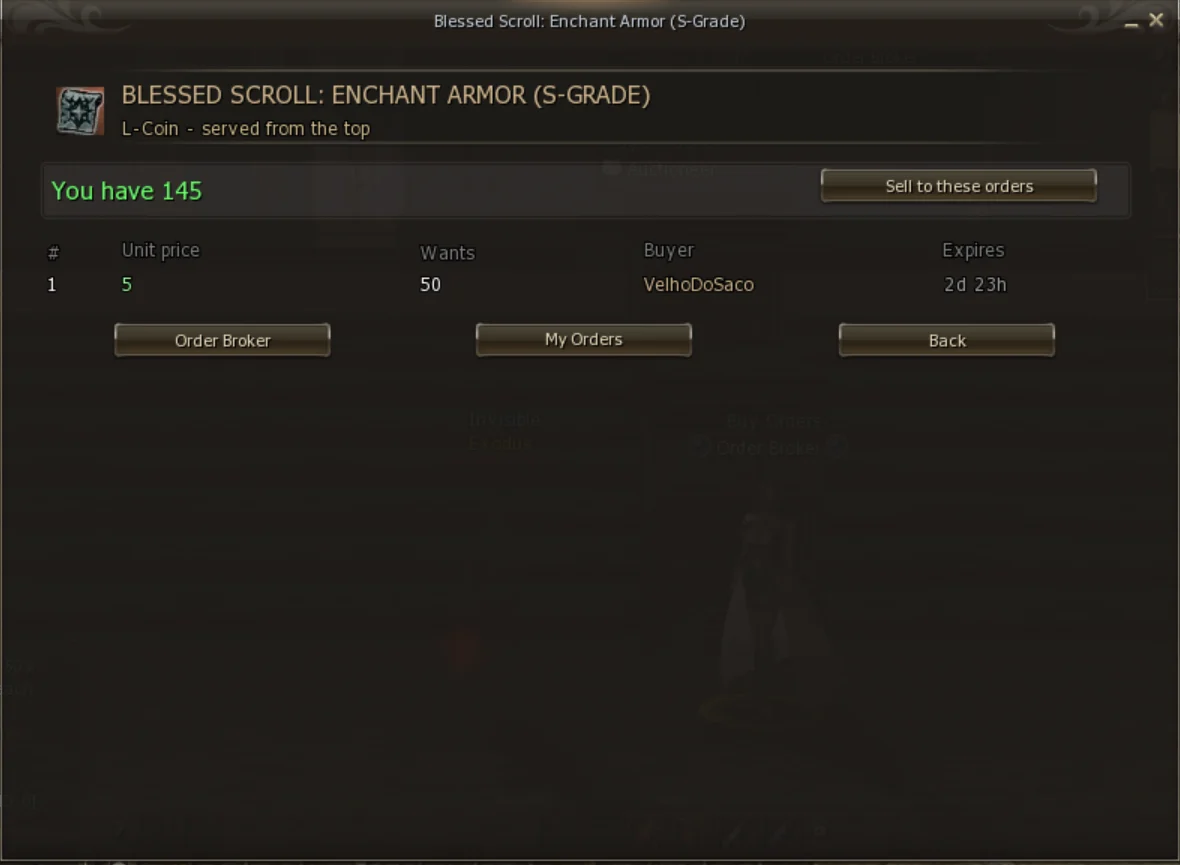
| Column | What it shows |
|---|---|
| # | The queue position. 1 is served first |
| Unit price | What that order pays per unit |
| Wants | How many units are still to be bought |
| Buyer | Who created the order |
| Expires | How long until the order expires |
If you have the item, You have and the Sell to these orders button appear at the top.
back to contents ↑The quickest path: Browse orders → What I can sell → Sell on the item. The sale screen shows what you need to know.
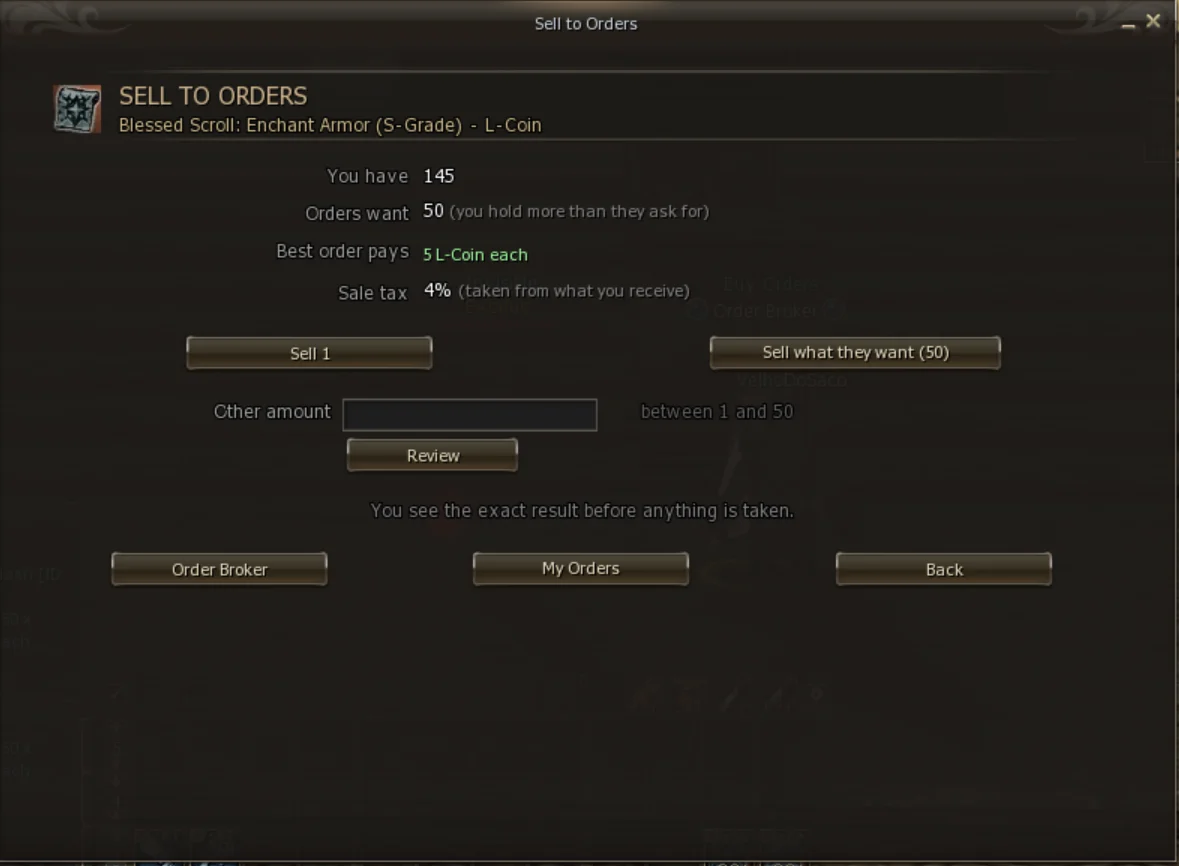
| Line | What it is |
|---|---|
| You have | How many of that item you carry |
| Orders want | How much the open orders will take from you now. If you hold more than that, the screen says so |
| Best order pays | The best price per unit |
| Sale tax | The sale tax (4%), taken from what you receive |
| Button | What it does |
|---|---|
| Sell 1 | Sells one unit |
| Sell what they want (N) | Sells what the orders ask for, not your whole bag. If you have 145 and the orders want 50, it is 50 |
| Other amount + Review | You type the amount, from 1 up to what the orders will take |
Any of the buttons leads to a review screen. Nothing leaves your bag until you click Confirm sale.
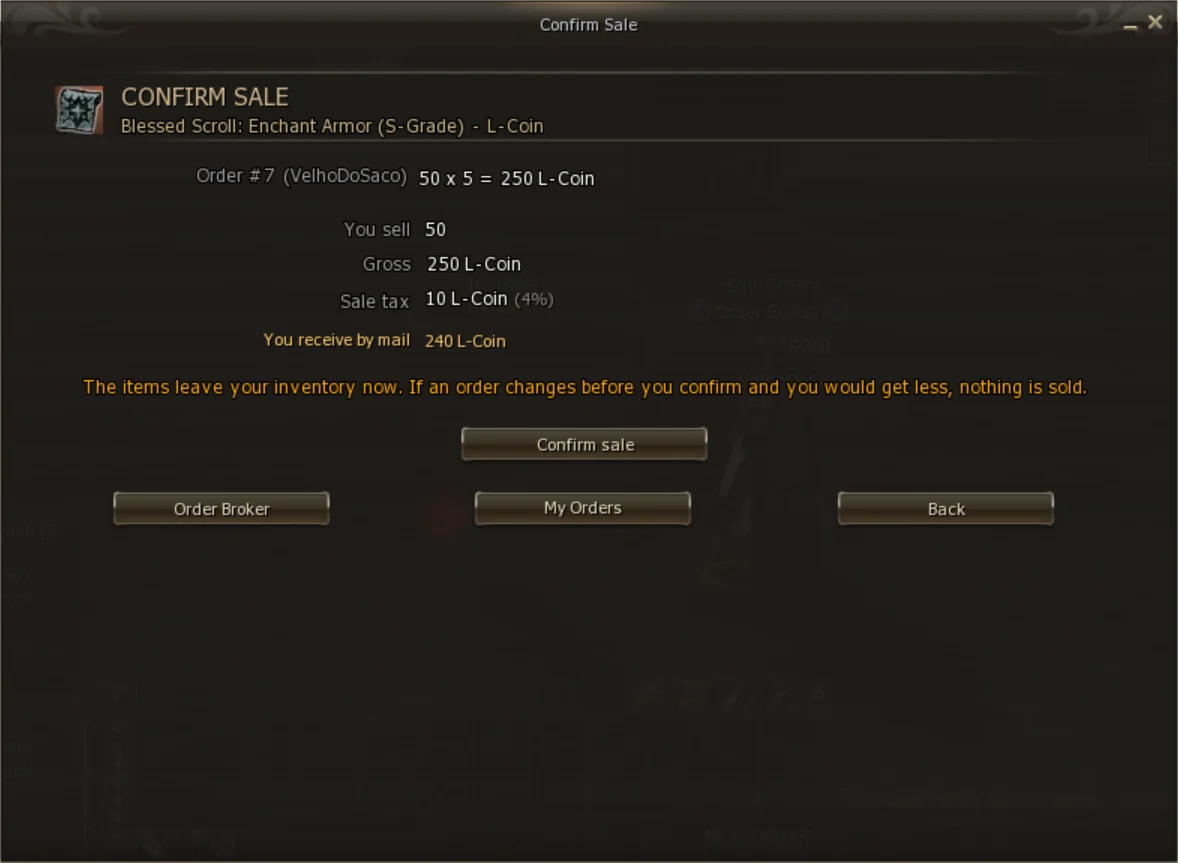
| Line | What it is |
|---|---|
| Order #… (buyer) | Each order filled: quantity × price = value. If the sale goes through more than one, one row per order, highest to lowest |
| You sell | How many units will leave your bag |
| Gross | The total sale value, before tax |
| Sale tax | The 4% tax on the Gross, rounded up |
| You receive by mail | What reaches you: Gross − tax |
In the example: 50 units at 5 L-Coin make 250; the tax is 10; you receive 240 L-Coin by mail.
If, between opening the review and clicking Confirm sale, an order is cancelled or changes and you would receive less than you saw, nothing is sold and the system asks you to check again. The amount you approve is the minimum you receive.
If one order is not enough, the sale continues to the next ones, always highest to lowest, up to 10 orders in a single sale. You receive one single payment by mail for the whole sale.
The moment you confirm, the units sold leave your inventory and go to the buyer's mail. The item goes whole and identical to what you had — the server moves the real item, not a copy.
This is the part that raises the most questions, and it is simple:
The money held for an order is always exactly (units still missing) × (price per unit). On the My Orders screen it shows as holding.
Every sale, cancellation and refund is recorded as a single operation: the item, the payment and the record go together or none of it happens. A routine also checks what was left pending when the server comes back. No held money is lost to a server crash.
Lists every order you created. Open ones come first.
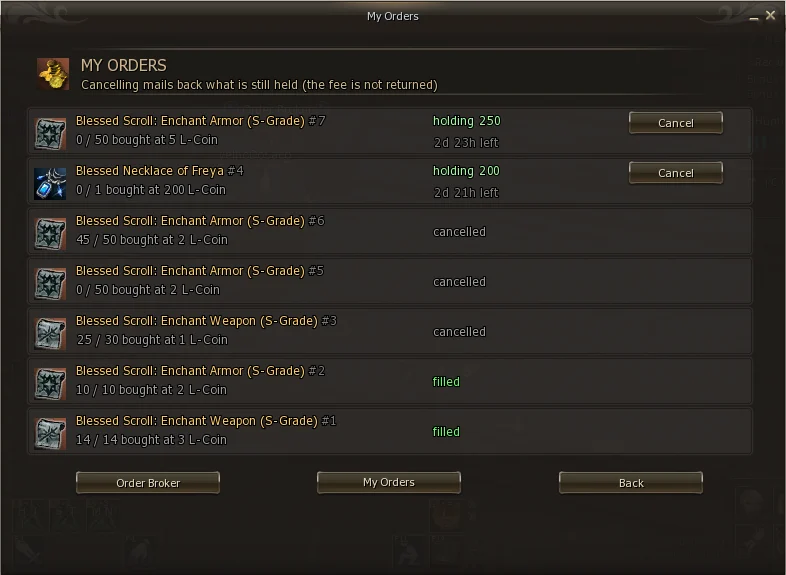
| State | Meaning |
|---|---|
| holding … | Open. Shows the money still held and the time left. Has the Cancel button |
| filled | Done. All units were bought |
| cancelled | You cancelled it. What had not been bought came back by mail |
| expired | The time ran out. What had not been bought came back by mail |
On each row, 25 / 50 bought at 2 L-Coin means: 25 of the 50 units were already bought, at 2 L-Coin each.
Click Cancel on the open order. There is no waiting period or condition: you can cancel at any time, even if part of it was already bought.
Cancelling does not require being at the Order Broker.
back to contents ↑An order closes in three ways, and in all of them the server handles it by itself — nobody needs to be online.
| How it closes | What you receive |
|---|---|
| All units bought | The units, by mail, with each sale. Nothing to refund |
| You cancelled | The units already bought and, by mail, the money still held |
| It expired | The units already bought and, by mail, the money still held |
In-game mail lasts 15 days. After that it expires and the attachment goes with it. Bought an item or sold something? Log in and collect.
The minimum level applies to creating an order and selling. To open the mail and collect what arrived there is no level requirement.
Every sale and every delivery is stored with the item, the mail number and the date. If there is any doubt about an item or a payment, staff can look it up and see exactly where it is — still in the mail or already collected, and by whom.
If an item does not show up in the search, or does not show as sellable for you, it falls under one of the rules on the right.
Whoever creates an order cannot specify augmentation or attribute. Accepting those items would make the buyer receive something different from what they asked for. To sell them, use the auction, which shows each item as it is.
The classic trick is creating an order with one character and selling to it with another, to move coin from one side and launder it on the other, or to fake a market price. Buy Orders have several layers against that.
| Rule | What happens |
|---|---|
| Your own order | You do not sell to your own orders |
| Same account | The order is skipped in your sale. Two characters on one account are the same person, no room for doubt |
| Same machine (HWID) | The order is also skipped |
| Same IP | The sale goes through and is flagged for staff. An IP can be legitimate — siblings in one house, an internet café — so it does not block, but it is recorded and reported |
| Character age | A character under 7 days old cannot create orders or sell. That is what catches the mule made on the spot |
| Order limit | At most 10 open orders per character and 20 per account |
The identity of whoever created the order is recorded at creation, and that of whoever sold, at the time of the sale. Staff can audit any order after the fact, even with everyone involved offline.
Orders are announced on the server, as in the auction, so those who have the item know someone is buying.
| When | Where it appears |
|---|---|
| New order created | Global chat and an on-screen message. It says who wants what, at what price, and that the sale is at the Order Broker in Giran |
| Order filled (partly or fully) | Global chat |
If you are the buyer and are online when someone sells to you, you also get a message right away — and the item always arrives by mail, even offline.
back to contents ↑No. Any player can sell to it while you are offline. The items wait in your mail.
Both show buyers' orders. Browse orders shows all of them, for any item. What I can sell shows only those for items that are in your bag, at the same enchant.
Cancel it in My Orders and create it again. The money comes back by mail, but the creation fee is not refunded — that is why the confirmation screen exists. Check before paying.
No. Cancel and create another with the new price, or create a second order for the same item at a higher price — the highest price is served first.
It is in your in-game mail. Open the inbox and collect the attachment. Remember the 15-day limit.
Yes. Cancel the order: the money still held comes back by mail. The fee does not.
Check three things: the item is equipped (unequip it); the enchant is the same as the order (a +3 order does not take +0); or the item has augmentation or an attribute, which do not go into orders.
Because the open orders only ask for that amount. The screen shows Orders want so you can see it. To sell the rest, wait for new orders to appear.
That is expected: you do not sell to your own orders.
No. Adena, Ancient Adena and L-Coin are currency and cannot be the item of an order. They are what you pay with.
10 per character and 20 per account.
There is a limit on actions per minute so the server is not overloaded. Wait a few seconds and try again.
back to contents ↑| Term | What it is |
|---|---|
| Buy order | The request of someone who wants to buy: item, enchant, quantity and price per unit. |
| Order Broker | The orders NPC, in Giran. The only entry point. |
| Market | One per currency. Exodus has two: Adena and L-Coin. |
| Unit price | The price per unit, not the total. |
| Order total (held) | Quantity × price per unit, held by the server. |
| Creation fee | A 2.5% fee at creation. Not refunded. |
| Sale tax | A 4% tax taken from the seller's payment. |
| Gross | The sale value before tax. |
| Holding | The money still held in an open order. |
| Filled | A completed order: all units were bought. |
| Queue | The orders for an item: highest price first, ties by the oldest. |
| Escrow (hold) | Money or item kept by the server until the sale happens. |
| Exact enchant | The order is only filled by an item with exactly that enchant. |
| What I can sell | The list filter that shows only what is in your bag. |